Your WordPress developer is moving on: a handover checklist for owners
A business owner told us this month that his web provider of ten years, a close friend, is "moving in a different direction" and will soon stop looking after the site. The friend was honest: the new AI work is not his expertise. By the owner's account, he did very good work for years.
When we looked, the site's core software had not been updated in about four years, and it depended on at least a dozen add-ons (plugins). The footer still said 2019, some links led to pages that no longer exist, and the opening hours disagreed between pages.
He is not alone. Clients tell us their firms are established, often leaders in their field, yet their share of enquiries is falling while the website sits untouched. When we run our site check, we usually find the same things.
You need not decide the site's future this week. You need the keys, a copy of everything, and an honest picture of its condition, in that order.
What you are taking over
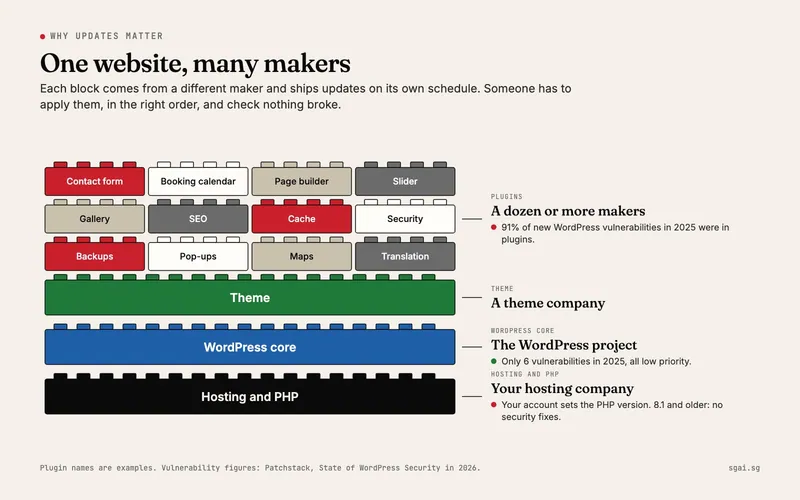
WordPress, behind 38.5% of all websites (W3Techs, checked 22 Nov 2026), is actively maintained. A site's core software comes from the WordPress project; the theme, the design template, from a theme company; each plugin, an add-on such as a contact form or a booking calendar, from a different maker. Underneath sits hosting, the rented server your site lives on, which runs PHP, the programming language WordPress is written in. Your hosting account sets the PHP version.
On the call we put it this way: plugins are like Lego blocks from different makers, and over the years a site collects a pile nobody fully owns. Each maker ships updates on its own schedule. Someone has to apply them, in the right order, and check nothing broke. When your developer leaves, so does that someone.
Your website handover checklist for the first week
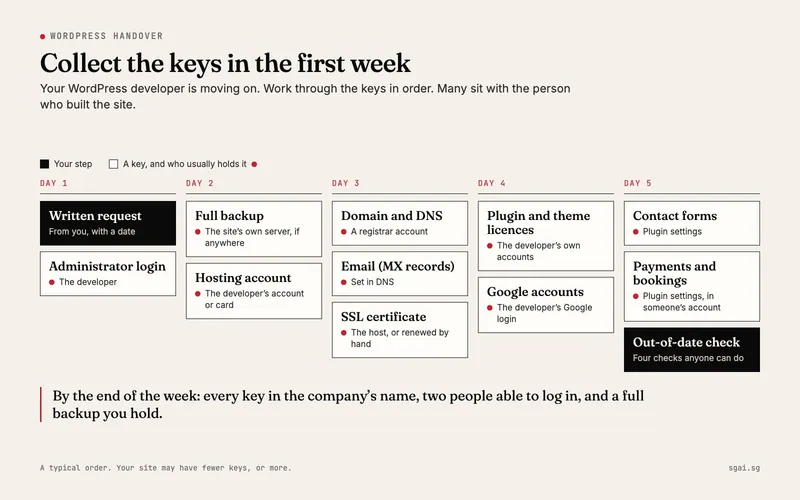
Ten keys, in order, with a written request on day 1 and the out-of-date check on day 5 (both below). Our guide to who actually owns your website shows how to look each one up.
| Key | What it is | Who usually holds it | What to ask for |
|---|---|---|---|
| Day 1: Administrator login | wp-admin, the site's back office | The developer, often as one shared login | Your own Administrator account, in your name |
| Day 2: Full backup | A complete copy you can restore: files plus database | The site's own server, if anywhere | A download you store yourself, and the backup schedule |
| Day 2: Hosting account | The rented server the site runs on | The developer's account or card | A move to a company account and card; the renewal date |
| Day 3: Domain and DNS | Your web address, rented from a registrar, and DNS, the address book that points it to your site and email | A registrar account, sometimes with the developer as registrant (legal holder) | The company as registrant, the registrar login, the expiry date |
| Day 3: Email (MX records) | DNS entries that route your email | Set in DNS, with mailboxes at your email provider | A copy of every DNS record before anyone edits them |
| Day 3: SSL certificate | The browser padlock: it keeps visits private | The host, or renewed by hand | Proof it renews automatically: new certificates last at most 200 days |
| Day 4: Plugin and theme licences | Keys that unlock paid add-ons and their updates | The developer's own accounts | A list of paid items, whose account holds each, and renewal dates |
| Day 4: Google accounts | Search Console (search), Analytics (visitors) and your Business Profile (Maps listing) | The developer's Google login | Owner access for a company account |
| Day 5: Contact forms | Where each enquiry is sent and stored | Plugin settings | A test enquiry through every form, landing in a company inbox |
| Day 5: Payments and bookings | Plugins that take money or appointments | Plugin settings, in someone's account | The connected accounts, whose name they are in, and where payouts go |
By the end of the week: every key in the company's name, two people able to log in, and a full backup you hold.
A .sg domain. To change registrar, SGNIC's FAQ (checked 22 Nov 2026) says the registrant gets a "domain transfer password", an authorisation code, from the current registrar; the new registrar files the request. The current registrar may ask for outstanding payments, and may approve or reject; if it does neither, SGNIC approves after 7 days. Change the registrant first, through your registrar.
What to ask your WordPress developer for, in writing
Send one friendly message, with a date. For example:
Thank you for looking after our website all these years. So nothing is lost when you step back, could you help with these by [date]?
- An Administrator login in my name.
- A full backup, files and database, that we can download.
- Logins or transfers for hosting, the domain registrar and DNS, and who the registrant is.
- A list of plugins and themes: which are paid, and whose account holds each licence.
- Where email, the SSL certificate, forms, payments and bookings are set up.
- Owner access to Search Console, Analytics and our Business Profile.
- Anything that needs attention, including updates you held back, and why.
We are happy to pay for your time to do this properly.
Is your WordPress site out of date? Four checks anyone can do
Log in with your own account. WordPress's Site Health guide (checked 22 Nov 2026) covers the first two checks.
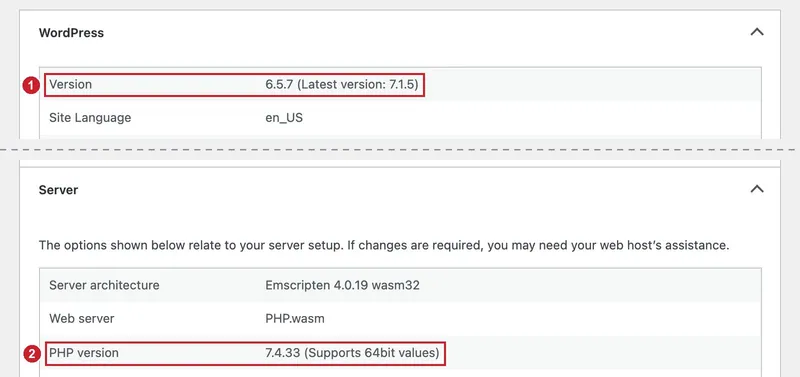
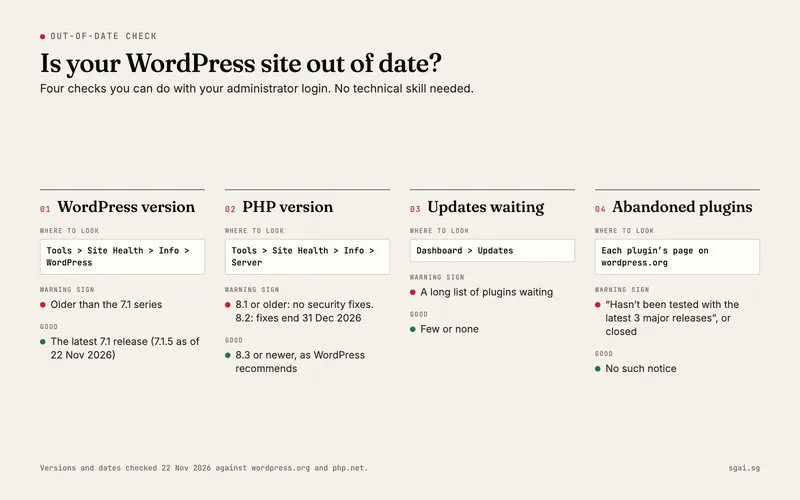
- WordPress version. Go to Tools > Site Health > Info, open WordPress and read the version. The release archive (checked 22 Nov 2026) lists 7.1.5, out on 18 November 2026, and says "only the most recent in the 7.1 series is safe to use and actively maintained".
- PHP version. On the same screen, open Server. PHP 8.1 and older are end of life, with no more security fixes, and 8.2's security support ends on 31 December 2026 (both checked 22 Nov 2026). WordPress recommends 8.3 or newer.
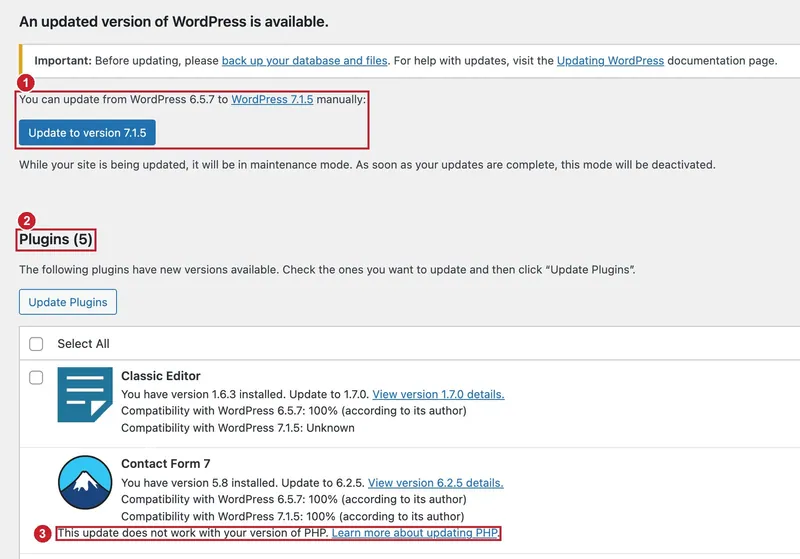
- Updates waiting. Open Dashboard > Updates and count the plugins waiting. Few or none is good. On a neglected site, do not press "update all" without a tested backup.
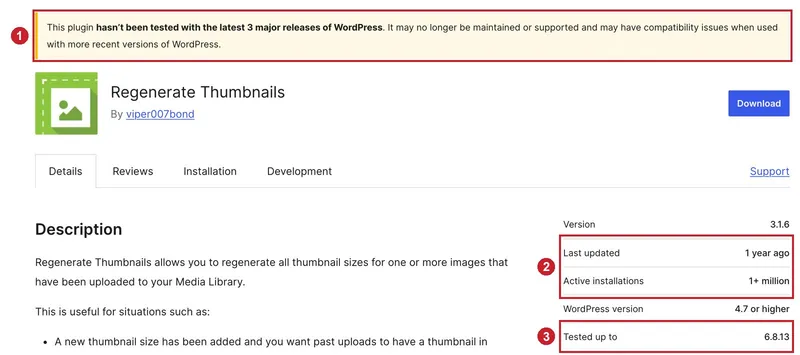
- Abandoned plugins. Look up each plugin on wordpress.org. A notice that it "hasn't been tested with the latest 3 major releases of WordPress", or that it is closed, means it may no longer be maintained (checked 22 Nov 2026).
Failing a check is common: W3Techs finds 29.5% of WordPress sites still on version 6 or older. For a wider look, try our ten security checks a manager can do.
Why it matters now
Plugins are where the holes are. Patchstack's State of WordPress Security in 2026 (checked 22 Nov 2026) counted 11,334 new vulnerabilities in the WordPress ecosystem in 2025: 91% in plugins, 9% in themes, and only six in WordPress core, all low priority. About half of the high-impact ones were exploited within 24 hours. WordPress is not the problem. Neglect is.
Old PHP gets no fixes. Once a PHP version reaches end of life, php.net warns, its users "may be exposed to unpatched security vulnerabilities".
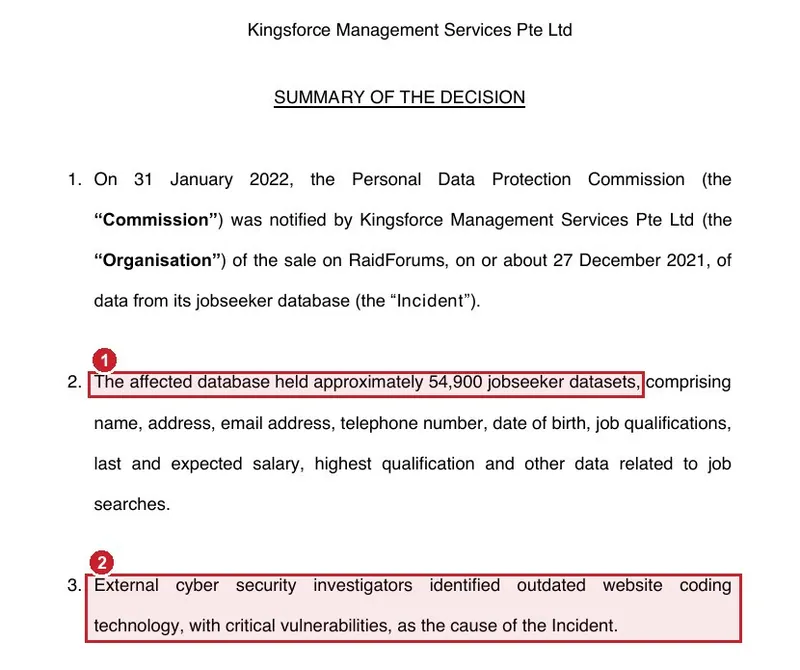
The law looks at the business, not the developer. Section 24 of the Personal Data Protection Act (PDPA), the Protection Obligation, requires an organisation to protect personal data "by making reasonable security arrangements", and contact-form enquiries usually include personal data. In a decision published in May 2023, data from Kingsforce Management Services' jobseeker database (about 54,900 records) was put up for sale online. Investigators traced it to "outdated website coding technology, with critical vulnerabilities"; maintenance had been "ad-hoc and limited to troubleshooting". The Personal Data Protection Commission (PDPC) found a breach and directed a plan for "regular patching, updates and upgrades". In a decision published in January 2021, a WordPress plugin bug exposed 178 customers' details; the retailer, The Future of Cooking, not its web designer, was found in breach and directed to pay S$9,000.
Who looks after it next: WordPress maintenance, managed hosting or a move
| Option | What it is | Suits you if | Watch for |
|---|---|---|---|
| Another WordPress maintainer | A freelancer or agency offering WordPress maintenance in Singapore: updates, backups and fixes on a plan | The site still works and mainly needs keeping safe | Tested updates, and backups kept off the server |
| Managed WordPress hosting | A host that specialises in WordPress and runs the server, PHP and backups | You have someone for content and small changes | Plugins and content may still be your job; ask what it updates |
| A move to Next.js (our recommendation) | A rebuild on Next.js, a modern framework, carrying over content, page addresses and data | The site is years behind, relies on abandoned plugins, or no longer describes the business: most sites we see | Keeping every page address, email and enquiry working |
Our recommendation for most established businesses is the third: use the handover as the moment to move to Next.js. To weigh it, read why we recommend Next.js, and when to keep WordPress, then how to move without losing Google rankings, emails or enquiries.
Whichever you choose, one rule holds: the code, content and data stay yours to take over. A provider can look after hosting, updates and backups as a service, but the accounts stay in your name.
An example week
This is an illustration, not a real client. A family firm that services commercial kitchen equipment learns its freelance developer is retiring. Monday: the director sends the written request and gets her own Administrator login. Tuesday: she saves a full backup to the company drive, and finds the hosting billed to the developer's card. Wednesday: renewal notices for the domain go to his email; she changes that. Thursday: of three paid plugins, two licences must be bought again. Friday: a test enquiry lands in his inbox, and Site Health shows PHP 8.1, unsupported since 31 December 2025. By Saturday she knows what she owns.
Questions owners ask
Can I leave the site as it is for now?
For a few weeks, if the keys are in your name and you hold a backup. New plugin flaws appear every week, so an unmaintained site gets riskier. Set a date to decide.
Do I own the site if my developer built it?
Your customers' data and the material you supplied are yours; accounts belong to whoever's name they are in. The design and code depend on what you agreed, so check the contract and get it confirmed in writing.
What if my developer cannot hand everything over?
Our ownership guide covers registrars and hosts. If you control the DNS, you can verify yourself in Search Console, which lets several people verify the same site. If the hosting is in their name, rebuilding on accounts you own may be simpler.
How do I choose who looks after it next?
Ask: will you work in accounts in our name? How often do you update, and do you test first? Where are backups kept, and when did you last restore one? If we leave, what do we take? The answer should be: everything.
What to do this week
- Send the written handover request, with a date
- Log in with your own Administrator account
- Download a full backup and store it yourself
- Move hosting and domain into the company's name; note the expiry dates
- List paid plugins and themes, and who holds each licence
- Get owner access to Search Console, Analytics and your Business Profile
- Send a test enquiry through every form
- Run the four out-of-date checks and note the results
- After the handover, change passwords and remove logins nobody uses
- Decide: another maintainer, managed hosting, or a move to Next.js
And thank your developer. Ten years of looking after a site is real work, and a clean handover is the last favour you can ask.