WordPress alternatives for Singapore businesses: keep it, or move to Next.js?
The person who looked after your WordPress site has moved on, or soon will. The site still works, more or less. Someone has quoted for a website revamp, a friend says "just move to Wix", and a developer suggests rebuilding from scratch. Here are the real options for a Singapore business, set out fairly. WordPress itself is rarely the problem. Neglect usually is.
Our recommendation, up front: for most established businesses, rebuild on Next.js. We build on it ourselves, and this website runs on it. The reasons are below, along with the cases where another option fits better.
Is WordPress dead, or still relevant?
Still relevant. WordPress is a content management system (CMS): the software behind a site's editing screen, where staff write pages without touching code. It is free, open source and actively developed. Version 7.0 came out on 20 May 2026 and 7.1 on 19 August, according to WordPress's release archive (checked 22 Nov 2026).
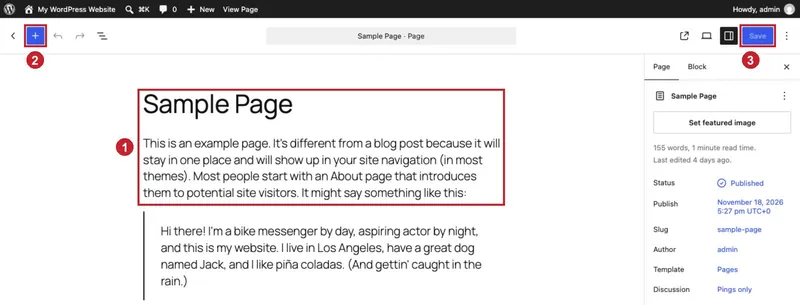
W3Techs counts WordPress on 38.5% of all websites. Shopify follows at 5.4%, then Wix at 4.2% and Squarespace at 2.4%; Webflow has 0.8%. W3Techs' yearly trends show WordPress down from 43.0% on 1 January 2026 (both checked 22 Nov 2026). That is a shift, not a collapse.
Where the trouble really comes from
WordPress itself is a solid base; the trouble is what gets added to it. A theme sets how the site looks. A plugin adds a feature, such as a contact form; the official directory lists over 79,000 free plugins (checked 22 Nov 2026). A page builder is a drag-and-drop design plugin that adds its own code to every page.
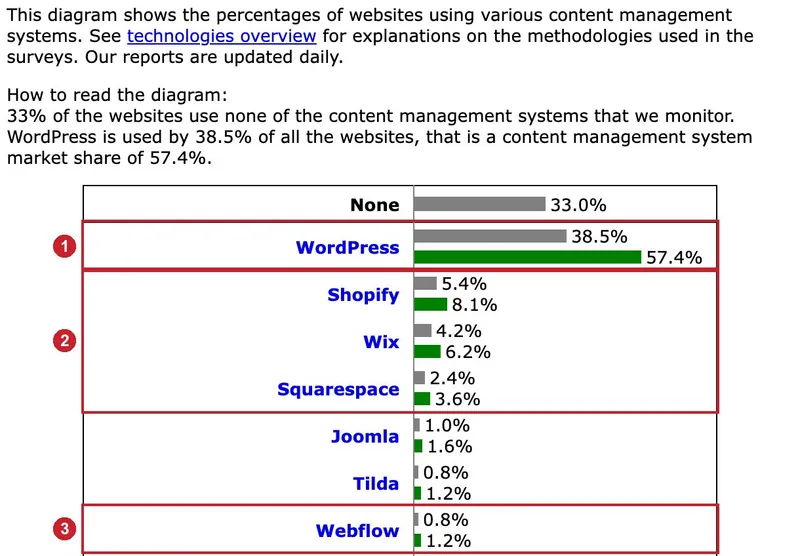
Think of plugins as Lego blocks from different makers. Each fits, but nobody owns the whole model, and each maker updates on its own timetable, or stops. The security firm Patchstack counted (checked 22 Nov 2026) 11,334 new vulnerabilities, or security flaws, in the WordPress ecosystem in 2025: 91% in plugins, 9% in themes, and just 6 in WordPress core, the main software. And 46% "did not receive a fix from the developer in time for public disclosure".
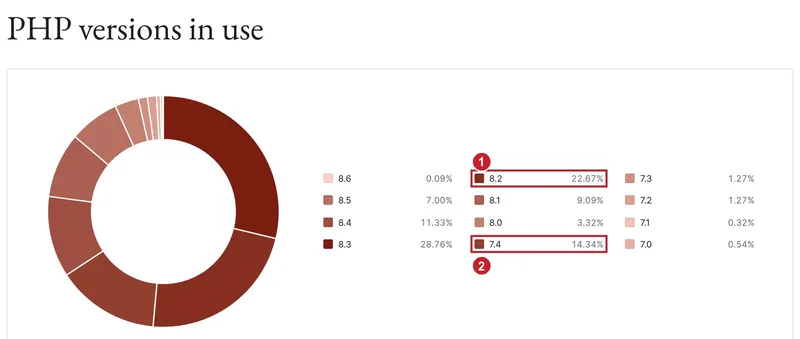
Then there is PHP, the programming language WordPress is written in. It runs on your hosting, the rented server that stores your site. Each PHP version gets four years of fixes, and WordPress recommends PHP 8.3 or greater. Yet from WordPress.org's statistics, we calculate that about 31% of WordPress sites run a PHP version the PHP project no longer supports. That includes 14% on PHP 7.4, end of life since 28 November 2022. Another 22% use PHP 8.2, whose security fixes end on 31 December 2026 (all checked 22 Nov 2026).
Speed suffers too. Google's Core Web Vitals (checked 22 Nov 2026), its measures of how a page feels to use, ask for the main content to load within 2.5 seconds. Plugins that each load their own files on every page make that harder. The last problem: no one is responsible for the updates.
What neglect looks like
Clients tell us a version of the same story. The firm is established, often a leader in its field, and its share of enquiries is falling while the website sits untouched. When we run our site check on an old WordPress site, we usually find core software years out of date, a dozen or more plugins piled on, slow pages, a footer stuck on an old year, broken links, and details that disagree between pages.
All of it can be fixed. The question is whether fixing it is the best use of your money.
Your four options
There are four real WordPress alternatives, and one of them is WordPress.
1. Stay on WordPress, maintained
Pay someone named to look after it: a maintainer, an agency, or a managed WordPress host (a hosting company that typically handles updates and backups).
- Suits: a site that still brings enquiries, staff who publish in WordPress, or a working WooCommerce shop (a WordPress shop plugin).
- Effort and dependence: monthly updates and checks, indefinitely. Automatic updates (checked 22 Nov 2026) help, but someone must check nothing broke.
- What you own: all of it. The built-in export tool (checked 22 Nov 2026) downloads your posts, pages and users as one file.
- Speed, security, AI reading: good when maintained. A WordPress page is built on every visit, on the server, so the text is in the page. A caching plugin, recommended in WordPress's own guide (checked 22 Nov 2026), keeps ready-made copies.
2. Move to a hosted builder: Wix, Squarespace, Webflow, or Shopify for a shop
A hosted builder rents you the software and hosting together, and handles security updates. This is the "WordPress vs Wix" question, and "WordPress vs Webflow" is the same trade-off.
- Suits: a small, standard site the owner edits. Shopify, for a shop.
- Effort and dependence: the least upkeep, but you depend on one company's prices and rules.
- What you own: your words, images and domain, not the site. At the time of writing (November 2026), Wix says a site "needs to be hosted and operated on Wix's servers". Squarespace exports some content, but not store pages or style settings. Webflow's code export, on some paid plans, leaves out "dynamic content (CMS items/pages)". Shopify exports products and customers as spreadsheets, while the design stays a Shopify theme (all checked 22 Nov 2026).
- Speed, security, AI reading: security is the platform's job, a real advantage. Speed and readability depend on the build.
3. Rebuild on Next.js: our recommendation
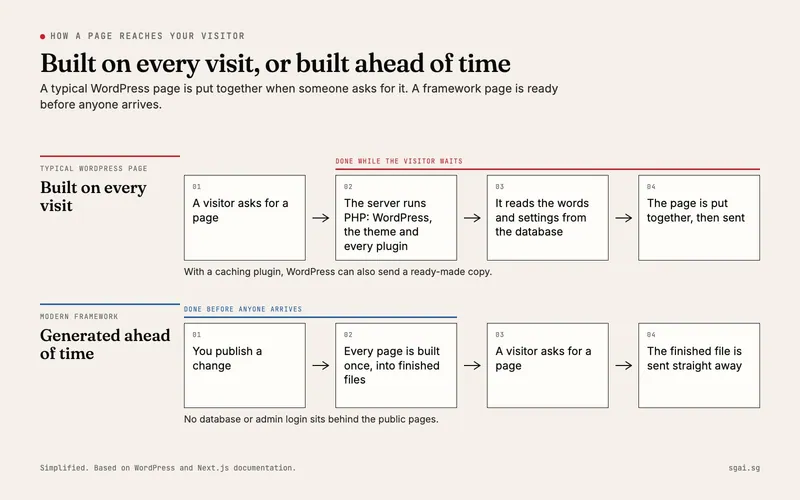
A framework is a developer's toolkit for building websites; Next.js is one. Pages are generated ahead of time: when you publish, Next.js "generates an HTML file per route", one finished page per address, says its documentation (checked 22 Nov 2026). Visitors get ready-made files, and a site made only of these is a static site. Content sits in files or a separate CMS.
- Suits: most established businesses: a fast, secure site with little upkeep for years, and room for custom features such as a product catalogue.
- Why we recommend it: pages are ready before anyone arrives, so they load fast; there are no plugins or public admin login to patch; the text sits in the page, where Google and AI assistants read it; and the code lives in your own account, so any Next.js developer can take over. Next.js is open source (MIT licence), maintained by Vercel and among the most widely used web frameworks, with over 143,000 stars on GitHub (checked 22 Nov 2026). Your team edits news and products in a simple content management system.
- Effort and dependence: the most work up front: it is a rebuild. Then no plugins, only occasional framework updates. Ask who else could take over from your developer.
- What you own: the code and content, if your contract says so.
- Speed, security, AI reading: fast, because nothing is assembled while the visitor waits. With no database or admin login behind the public pages, there is less to attack. Google's JavaScript SEO guide (checked 22 Nov 2026) recommends pre-rendering, partly because "not all bots can run JavaScript".
A WordPress to Next.js move should keep every web address.
4. Headless WordPress: keep the editing screen, replace the front
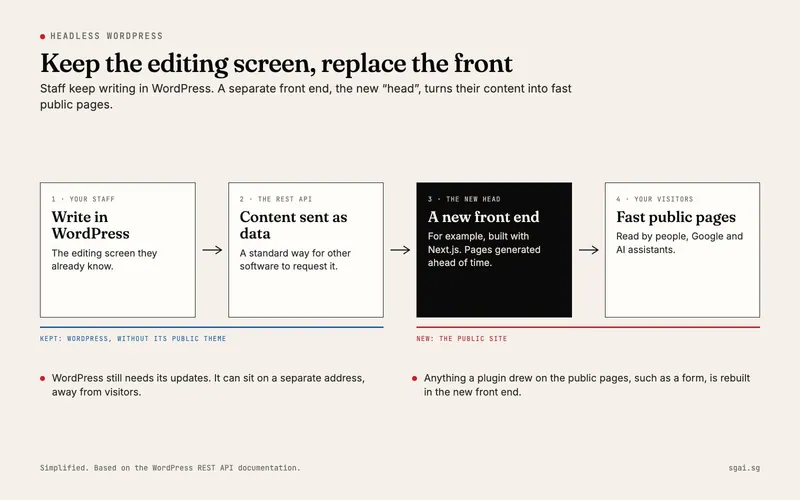
Staff keep writing in WordPress, but the public site, the "head", is replaced by a new front end, for example one built with Next.js. It fetches the content through the WordPress REST API (checked 22 Nov 2026), a standard way for other software to request it.
- Suits: large content teams trained on WordPress, with developers.
- Effort and dependence: the most: two systems to maintain, and anything a plugin drew on the public pages, such as a form, is rebuilt.
- What you own: both parts.
- Speed, security, AI reading: like a modern framework on the front. WordPress can sit on a separate address, away from visitors.
WordPress alternatives compared
On every option, AI assistants such as ChatGPT read a site best when it has real text in the page, structured data (a small block of code stating facts such as your name and address), and nothing hidden behind scripts. See why ChatGPT doesn't know your company and what is llms.txt.
| Stay on WordPress, maintained | Hosted builder | Next.js (our pick) | Headless WordPress | |
|---|---|---|---|---|
| Work up front | Least | Medium: pages rebuilt | Most: a rebuild | Most: a new front end |
| Upkeep you are responsible for | Monthly updates | Least | Little once built | Most: two systems |
| What you own | All of it | Content and domain | All of it, by contract | All of it |
| Speed and security | Good if updated, with few plugins | Platform handles security; speed varies | Fast, little to attack | Fast front; WordPress still needs updates |
| Readable by AI assistants | Good if the text is in the page | Varies by build | Text in the page | Text in the page |
Keep or move: a decision table
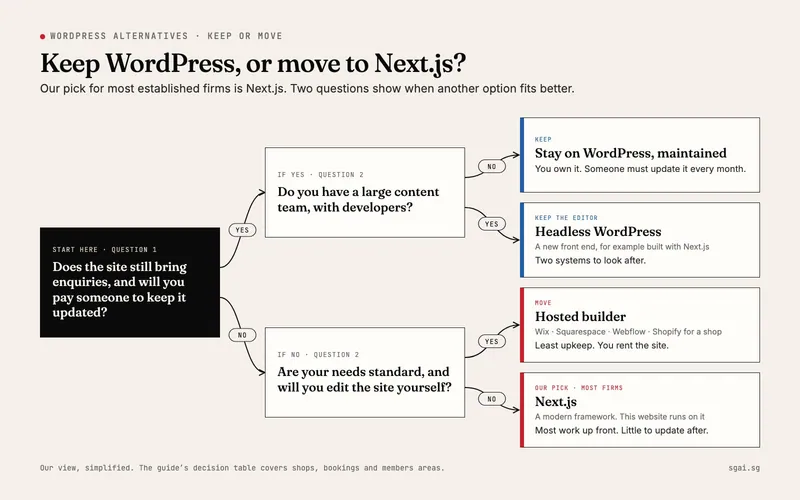
The diagram at the top starts with one question: does the site still bring enquiries, and will you pay someone to keep it updated? The table adds detail, in our view.
| Your situation | Usually the better choice | Why |
|---|---|---|
| A 10-page brochure site, rarely updated | Next.js (our pick), or a hosted builder if you will edit it yourself | WordPress upkeep buys little when nothing changes; a Next.js site needs almost none |
| A site with weekly news | Next.js with a simple CMS; or stay on WordPress, maintained, if the team will not change editors | Staff need an editor they like |
| An online shop | Shopify, with a Next.js storefront when design and speed matter; or WooCommerce on maintained WordPress | Checkout mistakes cost real money |
| A members area or bookings | Next.js with a proper database once you outgrow the plugin; until then, a maintained plugin | This is software, not pages |
| No one in-house can edit anything | Next.js with a simple editor and a named person who looks after it; or a hosted builder with training | The fix is a person as well as a platform |
A worked example
This is an illustration, not a client. A family-run industrial supplier in Ubi has a 40-page WordPress site, built in 2016 by a freelancer now overseas. It runs on PHP 7.4, with plugins from many makers, two of them abandoned. Its 300 products exist only as photos of an old catalogue. Nobody can edit anything, and the contact form emails a former employee.
Staying means a PHP upgrade, new plugins and a new catalogue: most of a rebuild, on the base with monthly upkeep. A hosted builder means 300 product pages made by hand, on a rented site. Headless keeps an editor nobody uses. Next.js turns one product list into every product page, generated ahead of time and edited in a simple CMS.
They choose Next.js, after securing the domain, hosting and logins. With a marketer publishing weekly in WordPress on current PHP, the answer would flip: keep it, with a good maintainer.
Questions owners ask
WordPress vs Wix: which is better for a small business?
Wix is simpler to look after: Wix does the upkeep. WordPress gives more freedom and a site you can move. Wix suits standard needs without technical help; to own the site outright, choose Next.js, which is what we recommend, or WordPress.
Will I lose my Google ranking if I move?
Not if the move is planned. Google's site-move guide (checked 22 Nov 2026) warns of "temporary fluctuation", but says permanent redirects, which forward each old address to its new page, "don't cause a loss in PageRank", its measure of link value. Our guide to moving off WordPress without losing Google rankings covers it step by step.
Can my staff still edit the site?
Yes. WordPress keeps its editor, hosted builders have their own, and a framework site can have a separate CMS for news and products. Ask to see the editing screen before you sign.
Is a website revamp the same as moving off WordPress?
No. A revamp can be a new design on the same WordPress site, with the old plugins and PHP still underneath. Moving changes the engine.
How to decide this month
- Secure the keys first: the domain, hosting and logins, with our handover checklist.
- Check the engine. In WordPress, Tools > Site Health > Info (checked 22 Nov 2026) lists your versions and plugins.
- Test your speed with Google's free PageSpeed Insights.
- Ask ChatGPT, Gemini and Perplexity what your company does, and save the answers to compare later.
- List what the site must do: pages, how often they change, who edits them, and any shop, bookings or members area.
- Find your row in the decision table, then get written quotes naming who maintains the site and what you will own.
- If you move, plan every redirect first, with our migration guide.
For most established firms, our recommendation is Next.js, and that is our work: we rebuild on it, carry every page, link and email across, and the code, content and data stay yours to take over. If yours is the rarer site that should stay on WordPress, a good maintainer is the better spend.