How AI assistants decide who to recommend
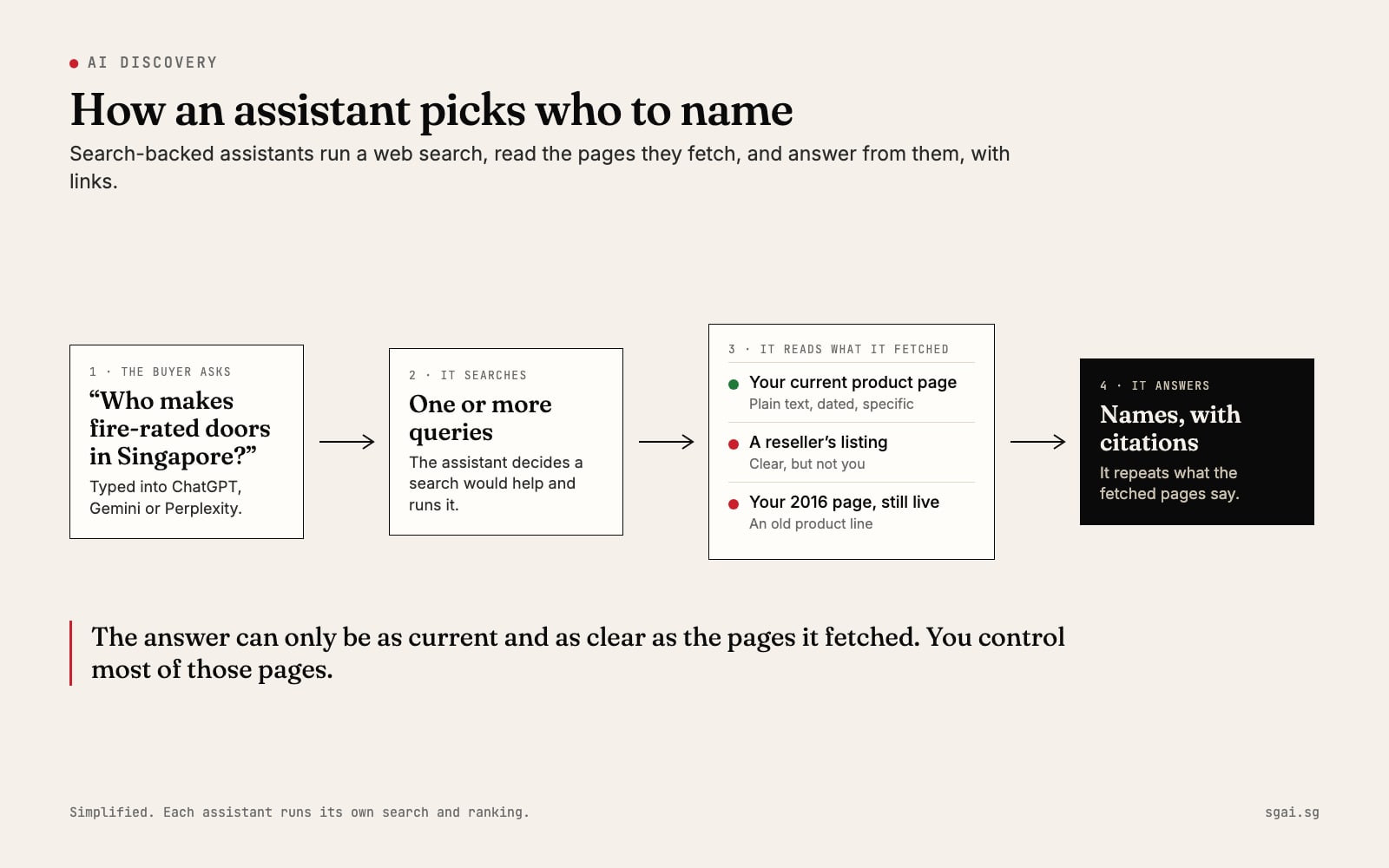
ChatGPT doesn't know you exist. Or it describes a product line you stopped selling years ago, or it sends buyers to a reseller. None of this is a verdict on your work. It is what happens when an assistant answers from the pages it can find and read. Once you see how that works, most of the fixes are plain and within your control.

Two ways an assistant answers
An assistant can answer from memory or from a search.
From memory. The model learned from a large body of text up to a cut-off date. If your company was small online at that point, it may know nothing, or know only what an old directory said.
From a search. This is the part that matters for buyers now. When a question needs current facts, such as "who supplies X in Singapore", the main assistants look things up first and answer from what they find. This is called grounding: the answer is tied to pages fetched at that moment.
Here is how each vendor describes it, in its own documentation:
| Assistant | What the vendor says | Source |
|---|---|---|
| ChatGPT | OpenAI's crawler OAI-SearchBot "is used to surface websites in search results in ChatGPT's search features". Sites that opt out of it will not appear in those answers, though they can still show as navigational links. | OpenAI crawlers overview (checked 8 Nov 2026) |
| Gemini | Gemini Apps "may provide links to sources and related content", shown under a Sources button. Google's developer docs describe grounding with Google Search: the model decides whether a search would help, runs one or more queries, and returns an answer with citations. | View related sources from Gemini Apps, Grounding with Google Search (both checked 8 Nov 2026) |
| Perplexity | It searches the web in real time, and "each answer includes numbered citations linking to the original sources". | How does Perplexity work? (checked 8 Nov 2026) |
| Google AI Overviews and AI Mode | A page must be "indexed and eligible to be shown in Google Search with a snippet". Google says there are no extra technical requirements and no special optimisation needed. | AI features and your website (checked 8 Nov 2026) |
The pattern is the same in all four. The buyer asks. The assistant searches. It reads the pages it fetched. It answers from them and links to them. So the answer can only be as current and as clear as those pages.
Why the wrong answer shows up
It does not know you exist
If no fetched page says clearly what you do, for whom and where, the assistant has nothing to repeat. This happens when your site describes the company in an image, a slider or a PDF brochure, or uses phrases like "total solutions provider" that never name the actual product. It also happens when your site blocks the crawlers that search features rely on. Check your robots.txt file, or ask whoever manages the site to check it, for rules that block OAI-SearchBot or Googlebot.
It describes an old product line
Old pages do not disappear on their own. A 2016 product page that is still live, still linked, and still in search results can be fetched today and repeated as current. The assistant has no way to know that page is out of date unless the page itself says so, or it is gone.
Google's documentation on HTTP status codes (checked 8 Nov 2026) says that when a page returns a 404 or 410, the indexing pipeline removes the URL from the index. Its guide to removing a page you host (checked 8 Nov 2026) adds that the Removals tool hides a page for about six months only, so the lasting fix is to remove or update the page itself.
It sends buyers to a reseller
A reseller's page often wins because it is simply clearer. It names the product, the price, the specifications and the stock, in plain text. Your own page, the maker's page, may say "contact us for details". Given one clear page and one vague one, the assistant repeats the clear one. You cannot stop a reseller from publishing. You can publish something better.
What to publish
You do not need special files or tricks. Google says so directly for its AI features. What helps is the same thing that helps a careful human buyer.
- One plain sentence about what you do. Near the top of the home page, in text: what you make or do, for whom, and where. For example, a fictional example: "Tan & Sons makes fire-rated timber doors for commercial buildings in Singapore, and has since 1987."
- One page per product or service, with the name, what it is for, the main specifications, and how to buy or enquire. In text, not in an image.
- Facts that can be checked. Founding year, certifications with the issuing body and date, real projects with dates and places. A claim with a source beats a claim with an adjective.
- The same facts everywhere. Your address, phone, founding year and product names should match on your site, your Google Business Profile, directories and social pages. When two sources disagree, the assistant has to choose, and it may not choose yours.
- A date on pages that change. A visible "last updated" date tells people and machines the page is current.
- Organization structured data on the home page. Google's guide to Organization markup (checked 8 Nov 2026) explains it helps search engines understand your company's details and tell you apart from similarly named organisations.
If you want to go further, our explainer on what llms.txt is covers one more file some sites add. It is optional.
What to fix
- Retire old product pages. Either update them to say clearly "discontinued in 2019, replaced by X" with a link, or remove them so they return a 404 or 410.
- Turn PDFs into pages. If your catalogue or price list lives only in a PDF, put the key facts on a web page too. Our post on what ChatGPT does with a wine list in a PDF shows why.
- Correct directories. Old listings with an old address keep feeding the wrong facts back.
- Unblock search crawlers if your site blocks them by accident.
A self-check you can do today
This takes about thirty minutes and needs no technical help.
- Ask ChatGPT, Gemini and Perplexity: "What does [your company] in Singapore do?" and "Who are the best [your product] suppliers in Singapore?"
- Click every source they cite. Write down which pages they used.
- For each wrong fact, find the page it came from. Is it yours, a reseller's, or a directory's?
- Read your home page with images turned off, or copy all its text into a document. Does the text alone say what you do, for whom and where?
- Search Google for your company name plus an old product name. If old pages appear, list them for retirement.
- Repeat the same questions in 60 days and compare.
We go into the background in why ChatGPT doesn't know your company.
Where we come in
Most of the list above is writing and housekeeping, and your own team can do it. Where owners ask for help is usually the rebuild underneath: a site where every product is a clear page, the facts come from one place, and nothing important is trapped in an image. That is the work we do, and everything we build stays in your name.