From spreadsheet to a catalogue your team edits
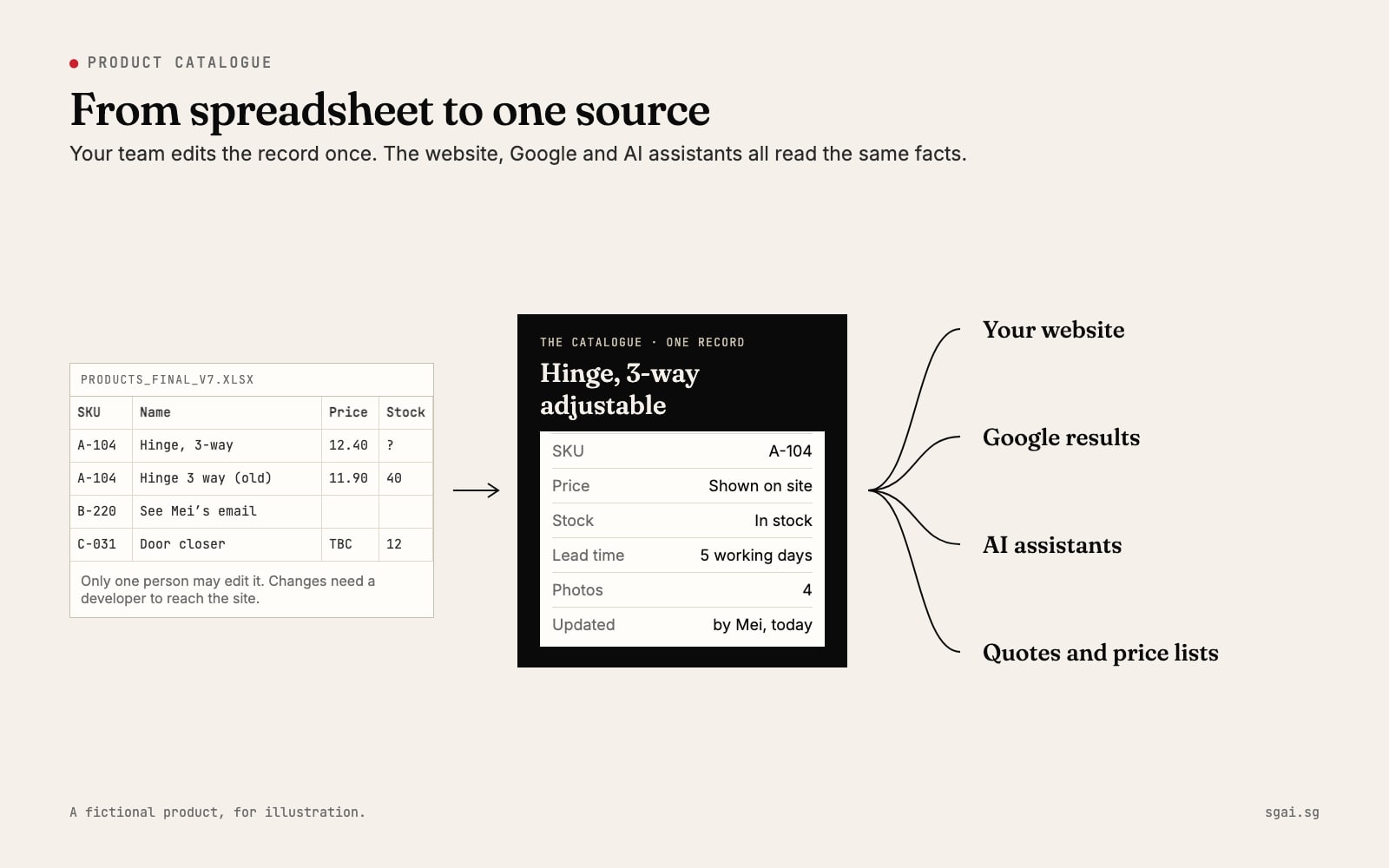
Your product list lives in a spreadsheet. Only one person really understands it, and every change to the website needs a developer, so the website stops changing. Prices drift, discontinued items stay up, and new ones never appear. The fix is not a bigger website. It is moving the list into a simple catalogue your own team can edit, so the website, Google and AI assistants all read the same facts.

Why the spreadsheet stops working
A spreadsheet is a fine place to start. It becomes a problem when it is the only source, and the website is a separate copy that someone has to update by hand.
Three things follow. First, the two drift apart, because updating the site costs time and money each time. Second, the spreadsheet itself splits: "products_FINAL_v7.xlsx" on one laptop, a different version in someone's email. Third, nobody outside the company can read it. Buyers, Google and AI assistants only see the website, and the website is out of date.
What a catalogue your team edits looks like
Think of it as a simple form behind a login. Each product is one record. Your staff fill in the fields and press save, and the website updates. No developer in the loop for everyday changes.
A good record has:
| Field | What it holds | Why it matters |
|---|---|---|
| Name and SKU | The product's name and your own code | One product, one record, no duplicates |
| Short description | What it is and what it is for, in plain words | This is the text people and machines read |
| Specifications | Size, material, rating, compatible models | Buyers compare on these |
| Photos | Several, with a sentence describing each | People need to see it; machines read the descriptions |
| Price, or "price on request" | Whatever you are willing to show | Leaving it blank looks like a mistake |
| Availability | In stock, made to order, discontinued | Stops buyers asking for things you no longer make |
| Lead time | "Ships in 5 working days" | Often the deciding fact for a trade buyer |
| Last updated | Set automatically on save | Shows the record is current |
Each person who edits has their own login. The system records who changed what and when. Someone can be allowed to edit stock but not prices. And because the catalogue is the only copy, there is no "latest version" to hunt for.
Why this matters for Google and AI assistants
When every product page is built from the same record, the facts stay consistent: the same name, price and availability on the product page, the category page and the quote. Consistency is what lets a search engine or an assistant trust a fact enough to repeat it.
The catalogue can also produce structured data, a small block of machine-readable facts behind each product page. Google's guide to Product structured data (checked 8 Nov 2026) explains that with it, "users can see price, availability, review ratings, shipping information, and more right in search results". Google's product data specification (checked 8 Nov 2026) for Merchant Center lists the basics it expects for each product: an id, title, description, link, image, availability and price. A good catalogue holds every one of these already.
AI assistants that search the web read the same pages. A clear page with one product, plain specifications and a current availability is much easier to quote than a row in a PDF price list. We explain how assistants pick sources in how AI assistants decide who to recommend.
Migrating from the spreadsheet: a fictional example
Lim Brothers Hardware is a fictional example: a trade supplier with about 800 products in a spreadsheet kept by one sales manager. Here is how the move might go.
Week 1: clean the list. Before anything is built, the team sorts the spreadsheet. They merge duplicates (two rows for the same hinge, one marked "old"), mark discontinued items, and agree one name per product. This is the hardest step and the most valuable. You can do it yourself, in the spreadsheet you already have.
Week 2: agree the fields. They decide which columns become fields, using the table above as a starting point. Anything that only lives in someone's head, like "this one needs the longer screws", becomes a note field.
Week 3: import. The cleaned spreadsheet is imported into the catalogue in one go. Photos are matched by SKU. Every record is checked by the person who knows that product range.
Week 4: hand over. Each of four staff gets a login and a short walkthrough. The old spreadsheet is archived, read-only, so nobody keeps editing the wrong copy.
After that, a price change is a two-minute job for the person who knows the price. A new product goes live the day it arrives, with photos, instead of waiting for the next time someone books a developer. And when a buyer asks whether something is in stock, the website already says.
What to insist on
Whoever builds your catalogue, these are not optional:
- Export anytime. You should be able to download every product, with every field, as a spreadsheet, whenever you like, without asking anyone. This is your insurance.
- Your own accounts. The catalogue, the hosting and the domain sit in the company's name, with company logins.
- Named logins. One per person, so you can see who changed what and remove someone who leaves.
- Simple enough for the person who knows the products. If only a developer can use it, you have rebuilt the old problem.
- Discontinued is a status, not a deletion. Old products should say "discontinued, replaced by X" or be removed cleanly, never left as a live page with a wrong price.
If your current site cannot do this, our guide to who actually owns your website is a good first step, because the catalogue should sit on accounts you control.
Where we come in
Cleaning the spreadsheet is work your team can start today, and it is the step that matters most. Where we help is the part after: a catalogue built around how your team actually works, connected to a fast website, with structured data on every product page. Every account we set up stays in your name, and the export button is there from day one.