27 November 2026 · 1 slides · Instagram · Facebook
How Singapore brands put GTA's CJ in their ads. Step by step · save this
We counted at least 16 Singapore businesses posting CJ pictures on Instagram, 19 to 26 Nov. FairPrice's got 13,882 likes.
Full tutorial
How to put GTA's CJ in your shop's ad: the full tutorial
At least 16 Singapore businesses posted CJ (GTA San Andreas) pictures on Instagram between 19 and 26 November 2026. Here is exactly how we made our example, step by step. Our example shop, Kopi Kolong, is fictional.
Getting ChatGPT
Sources: chatgpt.com/download and chatgpt.com/pricing, both read 27 Nov 2026.
- Web: chatgpt.com, in any browser.
- Phone: the ChatGPT app by OpenAI on the iPhone App Store or Google Play. Check that the publisher is OpenAI, because copycat apps exist.
- Desktop: the app for Mac and Windows from chatgpt.com/download.
- Sign up free with an email, Google, Apple or Microsoft account.
Do you need a paid plan?
- Free plan: it lets you upload images and create images in ChatGPT, with a usage limit. When you hit the limit, ChatGPT shows when you can try again. OpenAI publishes no fixed number, and the limit changes over time. (OpenAI Help Center, ChatGPT Free Tier FAQ, updated 27 Nov 2026.)
- Go plan: "more image creation".
- Plus plan: "more complex and accurate image creation".
- Pro plan: "unlimited and faster image creation".
- These plan descriptions are from chatgpt.com/pricing, read 27 Nov 2026. Prices for Singapore are shown on chatgpt.com/pricing.
- Tip: try it on Free first. If you hit the limit mid-campaign, Go or Plus gives you more tries.
- We made the example with OpenAI's image model through its developer API; results in the ChatGPT app may differ a little.
Step 1: a photo of your shop
Take a clear, straight-on photo of your shopfront or counter in daylight, with your signboard and your real products in the frame. This is image 1.
Step 2: the trick, a CJ reference sheet
Without a reference, the AI invents a random man in a tank top. With one, you get the real CJ.
Skip this step: use the CJ reference sheet we've already prepared. Download it below and attach it as image 2.
Or make your own:
Make one picture that tiles three kinds of images of CJ, all from the game's own renders (not fan art or drawings):
- Face close-up (the game's character render, head and shoulders).
- Full body, standing, so the AI sees his build and clothes: white tank top, blue jeans, belt, sneakers.
- Turnaround: the same model from the front, back and both sides.
Put them on one canvas (any free collage tool, or Canva) and save it as one image. This is image 2.
Compiled from GTA San Andreas game renders (Rockstar Games); for reference use.


Compiled from GTA San Andreas game renders (Rockstar Games); for reference use.
Step 3: a screenshot from the game
Find one real screenshot of GTA San Andreas (we used the Definitive Edition) with the look you want: the warm, hazy light and the 3D graphics. This is image 3. It tells the AI how the whole picture should be drawn.
Step 4: attach all three pictures to ONE message
- On your phone: in the ChatGPT app, tap the + next to the message box, choose your photos, and select all three before you send (shop first, then the CJ sheet, then the screenshot).
- On a computer: click the + (or the paperclip) next to the message box and pick the three files, or drag all three into the chat window.
- Then paste the prompt below into the same message and send it. Change "kopi stall", "KOPI KOLONG" and the kopi to your own shop, sign and product.
The full prompt (word for word)
Image 1 is my kopi stall. Image 2 is a character reference sheet of CJ from GTA San Andreas. Image 3 shows the game's graphics.
Make a gameplay screenshot from GTA San Andreas Definitive Edition set at my stall. Re-render EVERYTHING in the game's 3D graphics exactly like image 3: the stall, counter, cups, toast and CJ. Nothing should look like a photo.
CJ stands behind the counter, matching image 2 exactly: his game-model face, buzz cut, build, white tank top, blue jeans. He holds up a cup of kopi and grins.
Keep my red signboard "KOPI KOLONG" readable. Add the game HUD: clock, money, wanted stars, round radar map.
Step 5: save the result
- On your phone: tap the picture to open it, then tap the download (save) button to put it in your photos.
- On a computer: open the picture and click the download button.
If the sign or CJ's face is off, reply in the same chat with one fix at a time ("keep the signboard exactly as in image 1").
Tips
- Re-render everything: ask for the whole scene in the game's graphics, or you get a photo with a cartoon pasted on.
- Name what to keep: your signboard text and your real product, word for word.
- One message, all images: send the three pictures and the prompt together, so the AI sees them side by side.
- Speed beats polish: a trend like this lasts days. Post while it's still on.
Without vs with the reference sheet
Our first try gave only words ("add CJ: white tank top, blue jeans, buzz cut") and got a generic man who is not CJ. Adding the reference sheet as a second image fixed it: same face, build and clothes as the game's model. The lesson: when you want a specific character, show the AI pictures of him; don't only describe him.

 instagram.comInstagram @fairpricesg: CJ post (25 Nov 2026)instagram.comInstagram @songfabkt: CJ post (26 Nov 2026)instagram.comInstagram @sederhanasg: CJ post (25 Nov 2026)instagram.comInstagram @mantracollectivesg: CJ post (26 Nov 2026)instagram.comInstagram @smashedsg_: CJ post (25 Nov 2026)instagram.comInstagram @sataysfaction: CJ post (23 Nov 2026)

 gta.fandom.comReference sheet tile, face: GTA Wiki (Fandom), Carl Johnson

 cults3d.comReference sheet tile, full body: Cults3D, CJ GTA San Andreas
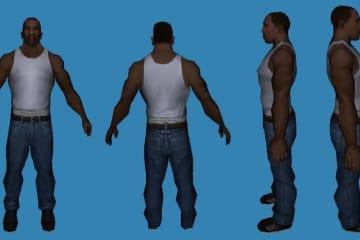
 gamebanana.comReference sheet tile, turnaround: GameBanana, GTA SA CJ 3D Model
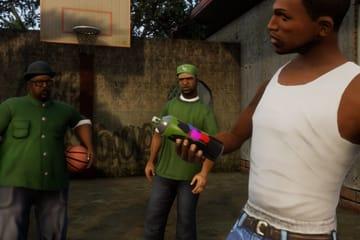
 gamingbolt.comStyle screenshot: GamingBolt, GTA San Andreas Definitive Edition graphics analysis

 chatgpt.comChatGPT download
 chatgpt.comChatGPT pricing